4-on-4-off shift schedule
Four on, four off, days then nights.
Examples temporarily replace the input and settings. You can restore your previous work.
Pro keeps the settings you use every week and puts them one click away. See Pro
Your files stay on your device
This tool runs entirely in your browser. Nothing is uploaded, nothing is stored, and you can even turn off your internet connection before you start.
Example
Worked example — 4-on-4-off shift schedule
Use the following inputs and settings. Keep other settings at the page defaults.
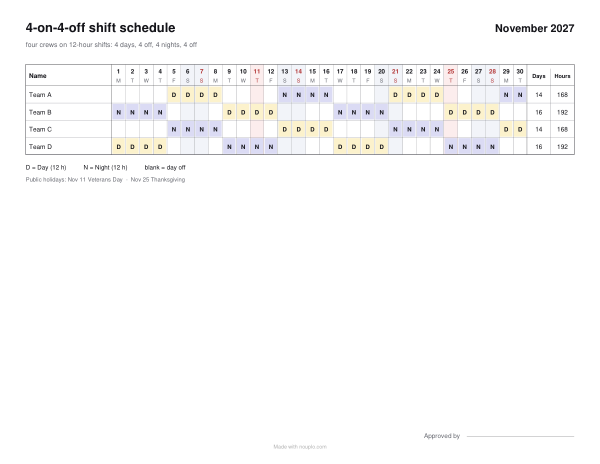
| Item | Value |
|---|---|
| pattern | 4-on-4-off |
| Year | 2027 |
| Cycle starts on (keep the same date next month to carry on) | 2026-11-02 |
| Output files | 1 |
| PDF pages | 1 |
| 279 × 216 mm |
Expected result — PDF · PDF pages: 1. The image shows the first PDF page.
How it works
- List the four crews or the people, one per line.
- Pick the month; shifts count as 12 hours, which you can change.
- To carry on from last month, enter the date the cycle started.
- Download the PDF and pin it up.
- For a roster spanning several sheets, find the page by its first and last employee and download just that sheet.
Frequently asked questions
- How does 4 on 4 off rotate?
- Four day shifts, four days off, four night shifts, four days off: a 16-day cycle. The crews are four days apart, so every day has one crew on days and one on nights.
- How many hours is that?
- Eight 12-hour shifts in sixteen days: 96 hours, 42 a week on average.
- Can the crews keep to days or nights?
- On this page the crews rotate. For fixed days and nights, use the shift rota maker with your own cycle.
- Is anything uploaded?
- No. The rota is made in your browser. The free plan prints a small line with our name at the foot of the sheet; Pro leaves it off.