Story map template
Characters, setting, problem, events, solution: print the story map.
Examples temporarily replace the input and settings. You can restore your previous work.
One box per line, in order. Start a line with a heading and a colon to rename the box, and separate the items with semicolons: “Methods: No checklist; Rushed training”. On a fishbone diagram each line is a bone, and a name alone is a category to fill in. For a T-chart, a topic like “Cats | Dogs” names the two columns; for a story map, “Title | Author”. Leave the box empty for a blank organizer.
Pro keeps the settings you use every week and puts them one click away. See Pro
Free PDFs end with a small “Made with nouplo.com” line Remove limits with Pro
Save to PinterestYour files stay on your device
This tool runs entirely in your browser. Nothing is uploaded, nothing is stored, and you can even turn off your internet connection before you start.
Example
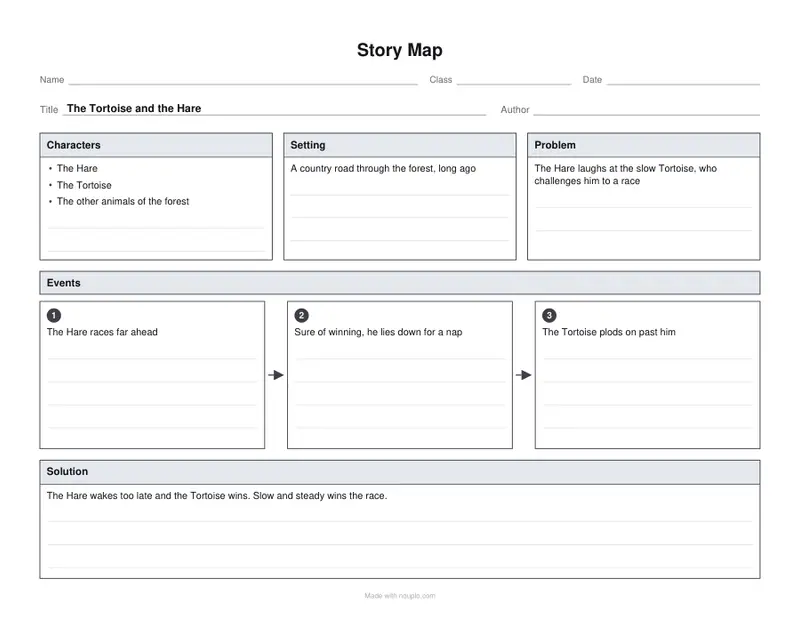
Example: a story map of The Tortoise and the Hare, filled in
The page opens with this fable in the boxes, one line per box in order. A teacher makes her own model of it: topic “The Tortoise and the Hare | Aesop”, and each line starting with its box’s name: Characters, Setting, Problem, Events, Solution. US Letter, orientation Best for the organizer.
- “Title | Author” fills the two lines at the top: The Tortoise and the Hare, Aesop.
- Each line goes into the box it names; “Characters: Tortoise; Hare; the other animals” lists three names in that box.
- The four events, separated by semicolons, fill numbered boxes 1 to 4 joined by arrows; with nothing typed there are three empty ones.
| Box | Typed |
|---|---|
| Characters | Tortoise; Hare; the other animals |
| Setting | A country road and a meadow, one summer day |
| Problem | Hare laughs at Tortoise for being slow, so Tortoise challenges him to a race |
| Events | Hare dashes far ahead; Hare lies down for a nap under a tree; Tortoise keeps plodding past the sleeping Hare; Hare wakes up and runs, but too late |
| Solution | Tortoise crosses the finish line first: slow and steady wins the race |
story-map.pdf, one landscape page, with Name, Class and Date lines at the top. For the class, clear the boxes and print it blank: every box gets writing lines.
How it works
- Type the book as “Title | Author”, or leave it empty.
- Type the boxes if you want them filled: characters, setting, problem, events, solution, one per line, events separated by semicolons.
- Download the PDF and print it.
Frequently asked questions
- What does the story map include?
- Lines for the title and author, then boxes for the characters, the setting and the problem, numbered event boxes with arrows, and the solution.
- How many events are there?
- Three, or as many as you type up to six, each in its own box.
- Can I print it blank for any book?
- Yes: clear the text box and the title line, and every box gets writing lines for students to fill in while they read.
- How do I fill it in before printing?
- Type one line per box, starting with its name and a colon, such as “Setting: A country road”, and separate several items with semicolons; the events go into numbered boxes in order. “Title | Author” in the topic line fills the top.
- Can I fit two on a page?
- Yes: choose Two copies per page for two half-size story maps on one portrait sheet, to cut apart.
- Is anything uploaded?
- No. The story map is made in your browser, and nothing you type leaves your device. On the free plan a small line with our name is printed at the foot of the last page.