Storyboard template
Plan every shot before you film it.
Examples temporarily replace the input and settings. You can restore your previous work.
Pro keeps the settings you use every week and puts them one click away. See Pro
Your files stay on your device
This tool runs entirely in your browser. Nothing is uploaded, nothing is stored, and you can even turn off your internet connection before you start.
Example
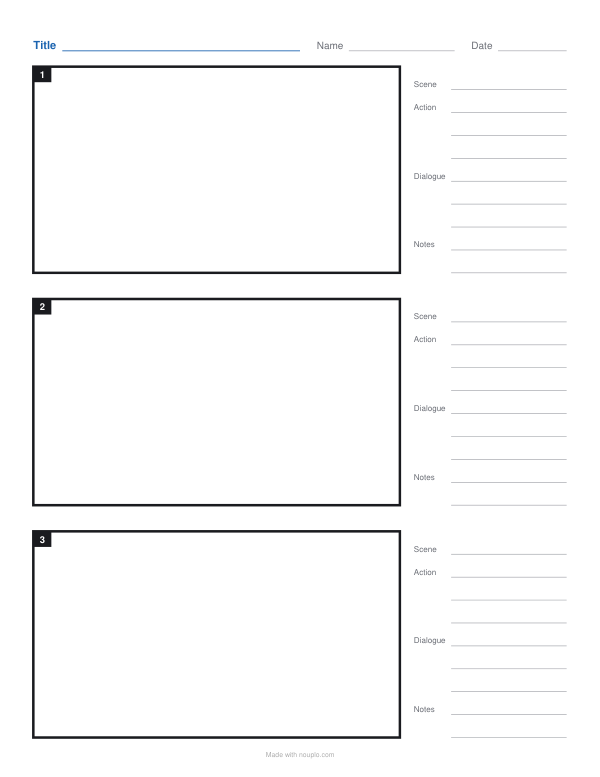
Worked example — Storyboard template
Use the following inputs and settings. Keep other settings at the page defaults.
| Item | Value |
|---|---|
| Layout | Storyboard |
| Pages | 1 |
| Page set number (change it for new manga layouts) | 1 |
| Output files | 1 |
| PDF pages | 1 |
| 216 × 279 mm |
Expected result — PDF · PDF pages: 1. The image shows the first PDF page.
How it works
- Choose 16:9 for video or 4:3, and how many frames on a page.
- Add the title line and the number of pages.
- Print, sketch each shot in a frame and write the action and dialogue beside it.
Frequently asked questions
- What is a storyboard for?
- It turns a script into pictures, shot by shot, so you can see the order, framing and pacing before filming — for videos, animations, ads and presentations.
- Which frame size should I use?
- 16:9 is the shape of most video today; 4:3 suits older formats, slides and animation drafts.
- How many frames on a page?
- Two or three leave room for detailed notes; six give an overview of a whole sequence.
- Do I need to draw well?
- No — stick figures, arrows for camera moves and a few words are enough.
- Is anything uploaded?
- No. The pages are made in your browser.