School name labels
One name, a sheet at a time, for everything that goes to school.
Examples temporarily replace the input and settings. You can restore your previous work.
Pro keeps the settings you use every week and puts them one click away. See Pro
Your files stay on your device
This tool runs entirely in your browser. Nothing is uploaded, nothing is stored, and you can even turn off your internet connection before you start.
Example
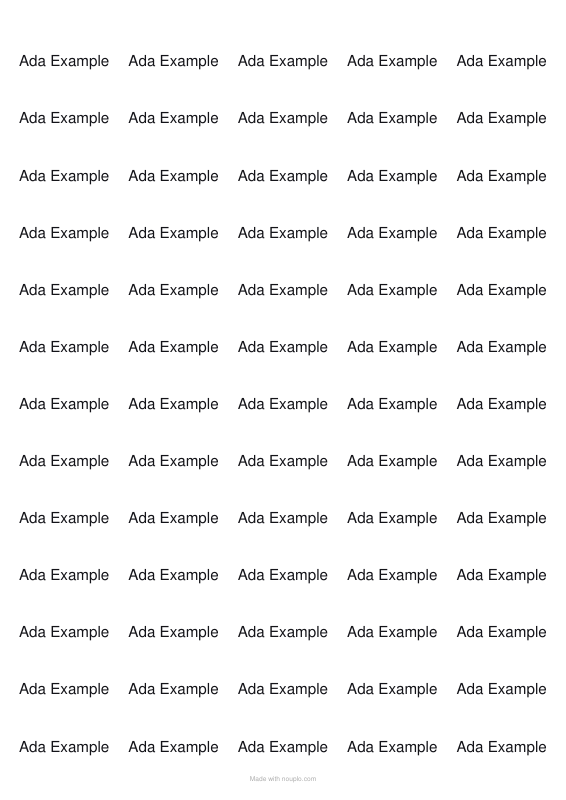
Worked example — School name labels
Use the following inputs and settings. Keep other settings at the page defaults.
| Item | Value |
|---|---|
| Sheet layout | A4 · 65 per sheet (38.1 × 21.2 mm) |
| Text position | Centred |
| Copies of each label | 65 |
| What the labels say — one per line, or a blank line between labels of several lines | Ada Example |
| Output files | 1 |
| PDF pages | 1 |
| 210 × 297 mm |
Expected result — PDF · PDF pages: 1. The image shows the first PDF page.
How it works
- Type the name once. To vary it — a first name for some, the full name for others — put a blank line between the versions.
- Leave “copies of each label” at 65 to fill the sheet with the same name.
- Choose the smallest layout for pencils and rulers, or a larger one for lunch boxes and bags.
- Print on label sheets at 100 %. For things that get washed, use waterproof label sheets.
Frequently asked questions
- How many labels will I get?
- Sixty-five from the smallest A4 layout, forty-four from the next size up. Fill a sheet with one name, or use several names and give each a number of copies.
- Will they survive the dishwasher?
- That is down to the label sheets, not the printing. Waterproof or laminated sheets last; plain paper labels do not.
- Can I fit a name and a class on one label?
- Yes — put the name on one line and the class on the next, with a blank line before the next label. At this size, keep both short.
- The print is a few millimetres off my labels. Can I fix it?
- Yes — use the two nudge boxes. Print the outlines on plain paper first, hold it against a label sheet up to the light, and nudge by the difference you see. Also check that the printer is set to 100 % and not “fit to page”, which shrinks everything by a few per cent.
- Is it free, and is there a watermark?
- It is free, and label sheets never carry a line of ours: they are stuck on parcels and lunch boxes, so there is nowhere for it to go.
Made for a specific use
Related tools
☰ Label sheet printing Your text laid out at true size on the label sheet in your drawer. ✉ Text tools Address Japanese postcards Type the address in Japanese; it comes out vertical, in the right places, as a Japanese reader expects. ▧ Printable graph paper Grids drawn as exact vector lines, so they print sharp and true to size. 名 Business card maker A sheet of ten cards, drawn as sharp text and rules, ready to print and cut.