Cleaning schedule template
A little every day keeps the house clean.
Examples temporarily replace the input and settings. You can restore your previous work.
Pro keeps the settings you use every week and puts them one click away. See Pro
Preview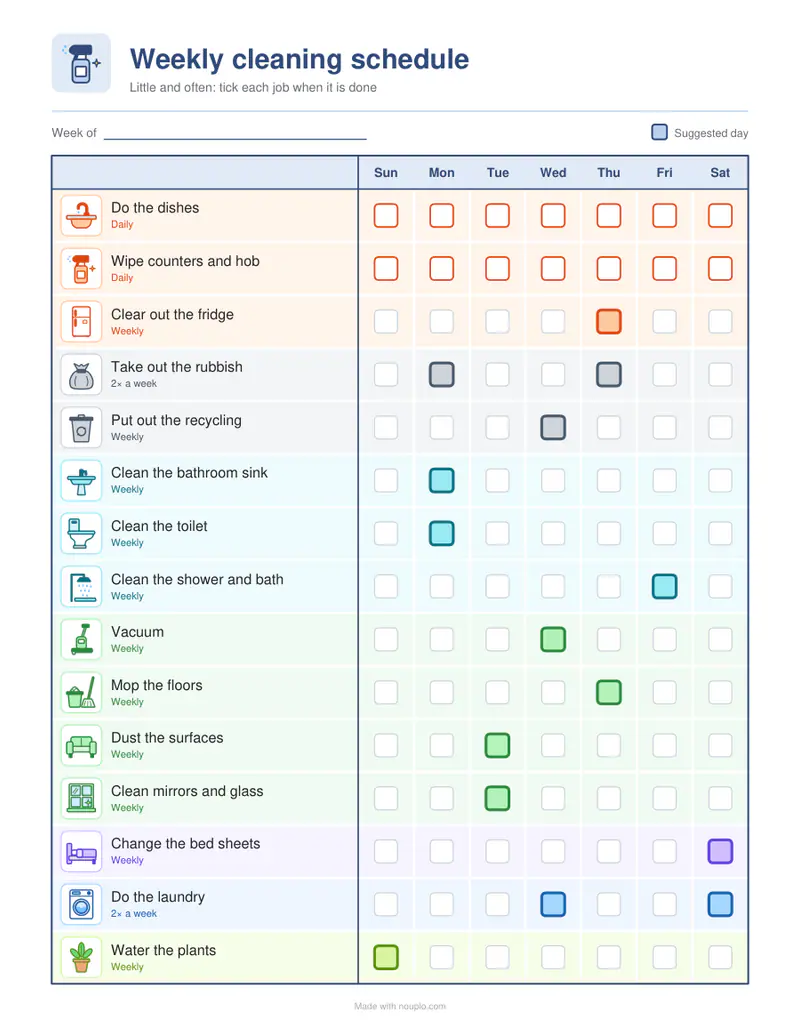
Free PDFs end with a small “Made with nouplo.com” line Remove limits with Pro
Save to PinterestYour files stay on your device
This tool runs entirely in your browser. Nothing is uploaded, nothing is stored, and you can even turn off your internet connection before you start.
Example
Example: the weekly cleaning plan as it opens, day by day
Cleaning plan by Week (day by day), the tasks given, in colour, US Letter. The week runs from Sunday to Saturday, under a Week of line for the date.
- Daily jobs have a box every day; weekly ones have their suggested day picked out and lighter boxes on the other days, so they can still be ticked when it suits.
- The rubbish goes out twice a week and the laundry is done twice; every other job once.
- Your own tasks replace the list: a line naming a built-in job keeps its days, any other is weekly on Monday, Wednesday, Friday and so on, unless days follow a bar (“Bins | Mon, Thu”).
| Job | How often | Suggested day |
|---|---|---|
| Do the dishes | Daily | every day |
| Wipe counters and hob | Daily | every day |
| Clear out the fridge | Weekly | Thursday |
| Take out the rubbish | 2× a week | Monday, Thursday |
| Put out the recycling | Weekly | Wednesday |
| Clean the bathroom sink | Weekly | Monday |
| Clean the toilet | Weekly | Monday |
| Clean the shower and bath | Weekly | Friday |
| Vacuum | Weekly | Wednesday |
| Mop the floors | Weekly | Thursday |
| Dust the surfaces | Weekly | Tuesday |
| Clean mirrors and glass | Weekly | Tuesday |
| Change the bed sheets | Weekly | Saturday |
| Do the laundry | 2× a week | Wednesday, Saturday |
| Water the plants | Weekly | Sunday |
cleaning-schedule-weekly.pdf, one page: 15 jobs, never more than three suggested on one day besides the two daily ones, to hang on the fridge and tick off.
How it works
- Choose a weekly plan, a monthly plan or a checklist by room.
- Keep the tasks given or type your own, one per line; put the days after a bar if you like: “Bins | Mon, Thu”.
- Print, hang it on the fridge and tick off each chore.
Frequently asked questions
- What should be done daily and weekly?
- Daily: the dishes, and the counters and hob. Weekly: vacuuming, mopping, the bathroom, the bed sheets and the recycling, with the rubbish and the laundry twice a week. Monthly: the oven, inside the fridge and descaling; the windows belong to the seasonal clean.
- Can I use my own tasks?
- Yes — type them one per line and they replace the list given.
- Is there a version for roommates?
- Yes — the cleaning rota turns everyone’s names through the jobs week by week.
- Which plan should I choose?
- The weekly plan to build a habit, the monthly plan for bigger jobs, the room checklists to work through the house.
- Which day is each job on?
- Each weekly job has a suggested day: the bathroom sink and the toilet on Monday, dusting on Tuesday, vacuuming on Wednesday, mopping on Thursday, the shower on Friday and the bed sheets on Saturday, with the rubbish on Monday and Thursday. The other days have lighter boxes for when another day suits better.
- Can I make one of my own tasks daily?
- A line that names a built-in daily job, such as “Do the dishes”, keeps a box every day. Any other line becomes weekly with a suggested day of its own, but its row still has a box on every day to tick. To choose its days, put them after a bar: “Water the plants | Daily” or “Bins | Mon, Thu”.
- Is anything uploaded?
- No. The pages are made in your browser.