Printable thank-you cards
Say thank you with a card you printed yourself.
Examples temporarily replace the input and settings. You can restore your previous work.
Pro keeps the settings you use every week and puts them one click away. See Pro
Your files stay on your device
This tool runs entirely in your browser. Nothing is uploaded, nothing is stored, and you can even turn off your internet connection before you start.
Example
Example: an end-of-year thank-you card for a second-grade teacher, to colour in
At the end of the school year Mia, 7 (fictitious), wants to give her teacher a card she has coloured herself. Her dad enters: name on the front “Ms. Rivera”, a message of her own, signed “Mia”, Fold: in four, Colours: outlines to colour in, Paper: US Letter.
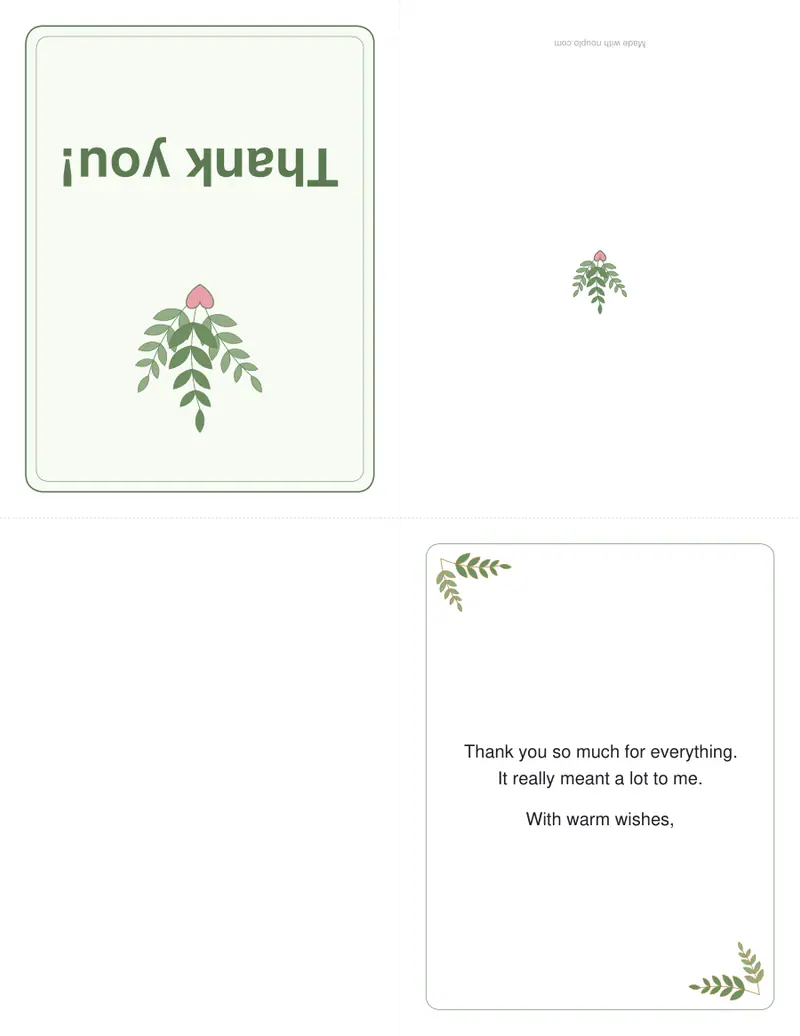
- The greeting is left empty, so the front says “Thank you!” over the leafy drawing and, under it, “For Ms. Rivera”: the card adds the “For” itself.
- Inside: “Thank you for a wonderful year in second grade”, “and for helping me love reading.”, “I will miss your class!”, a blank line, “Love,”. That ends in a comma, so “Mia” signs right under it.
- thank-you-card.pdf is one page, printed on one side: front and back along the top, upside down, the inside along the bottom. Every drawing is an outline, ready for crayons.
- Fold the sheet in half across with the print outside, then in half down the middle: the card is 4¼ × 5½ in and fits an A2 envelope (4⅜ × 5¾ in).
| Part of the card | What is printed |
|---|---|
| Front | “Thank you!” with leaves, and under it “For Ms. Rivera” |
| Inside left | Nothing: room for a drawing or a class photo |
| Inside right | Mia’s message, then “Mia” |
| Back | A small drawing; on the free plan also a small “Made with nouplo.com” line |
A card the size of a shop-bought note card from one sheet of plain paper. For the classroom aide, change the name on the front and download again. For a sturdier card choose “In half”, print both sides on card stock and fold once to 5½ × 8½ in.
How it works
- Type who it is for and what you are thanking them for, or keep the example.
- Sign it, and choose colour or outlines to colour in.
- Download the PDF, print it at 100 % and fold along the dashed lines: in four, fold the sheet across with the print outside, then in half down the middle.
Frequently asked questions
- What should I write in a thank-you card?
- Name what they did and what it meant: “Thank you for the lovely blanket — the baby sleeps under it every night.” Two or three sentences are plenty.
- How do I fold it?
- For the card in four: print on one side, fold the sheet in half across with the print outside, then fold it in half again down the middle — the front ends up on top and the message inside on the right. For the card in half: print on both sides, flipping on the short edge, and fold once.
- What paper should I use?
- Plain paper works for the card in four, which is two layers thick. For the card in half, card stock of 160–250 g/m² (60–90 lb cover) feels like a shop-bought card, if your printer takes it.
- Can I print several?
- Make one card, print as many copies as you need, and write each name by hand — or change the name and download again.
- What size is the folded card?
- Folded in four, a US Letter sheet makes a 4¼ × 5½ in card, which fits an A2 envelope (4⅜ × 5¾ in), and an A4 sheet makes an A6 card (105 × 148 mm) for a C6 envelope. Folded in half, Letter makes 5½ × 8½ in and A4 makes A5 (148 × 210 mm).
- What is printed inside if I leave the message empty?
- A short general message: “Thank you so much for everything. It really meant a lot to me.”, then “With warm wishes,” with your name signed under it. To leave the inside blank for handwriting, type a single space in the message box.
- Is anything uploaded?
- No. The card is made in your browser; nothing you type is uploaded.